Your Tracking Boards have been automatically upgraded to AI Bill Tracking, so you can focus on strategy, not screening. There is nothing to rebuild and no bills to re-tag. AI now scans every bill, ranks it against your priorities, and works from the issues you already manage in Issue Management.
Your upgraded boards were built from your existing keywords, so you will see the same results you rely on today, now in an enhanced workspace.
Here are the five changes and how to use them before 2027 sessions start.
Run Your 2027 Bill Tracking in AI Bill Tracking
If your team tracks state legislation, do your 2027 tracking in AI Bill Tracking. It’s where every new bill tracking feature in Quorum now lives, from AI summaries to the Bill Tracker Agent.
The enhancements came from user research and interviews with Quorum customers, whose judgment on legislation is the hardest thing to teach and the easiest thing to lose. It also doesn’t scale the way bill volume does. Five reviewers triaging the same tracker means five slightly different standards for “high priority.” AI Bill Tracking gives every reviewer the same starting point on every bill, whether you cover dozens of legislatures with Quorum State or Congress with Quorum Federal.
1. See What Matters On A Bill Up Front
Based on interviews with the people who review bills every day, Quorum enhanced the AI Bill Tracking workspace to put what matters on a bill up front.
When you open a bill, you see what changed, what to track and where it stands. Reviewed and unreviewed bills, relevance, summaries and the Agent’s reasoning sit on one screen. Your team can review, assign and brief without jumping between pages.
2. Personalized Bill Summaries
Personalized summaries tell you what a bill means for your organization, so you don’t have to read all 50 pages to find out. A standard summary says what a bill does. A personalized summary says what matters in it for you.
Each summary is written from the context of the issue the bill belongs to. A healthcare bill gets a summary shaped by your healthcare issue. An energy bill gets one shaped by your energy issue. Your reviewers can scan a bill in seconds and spend their time on the ones that need a closer read.
3. The Bill Tracker Agent Does the First Pass
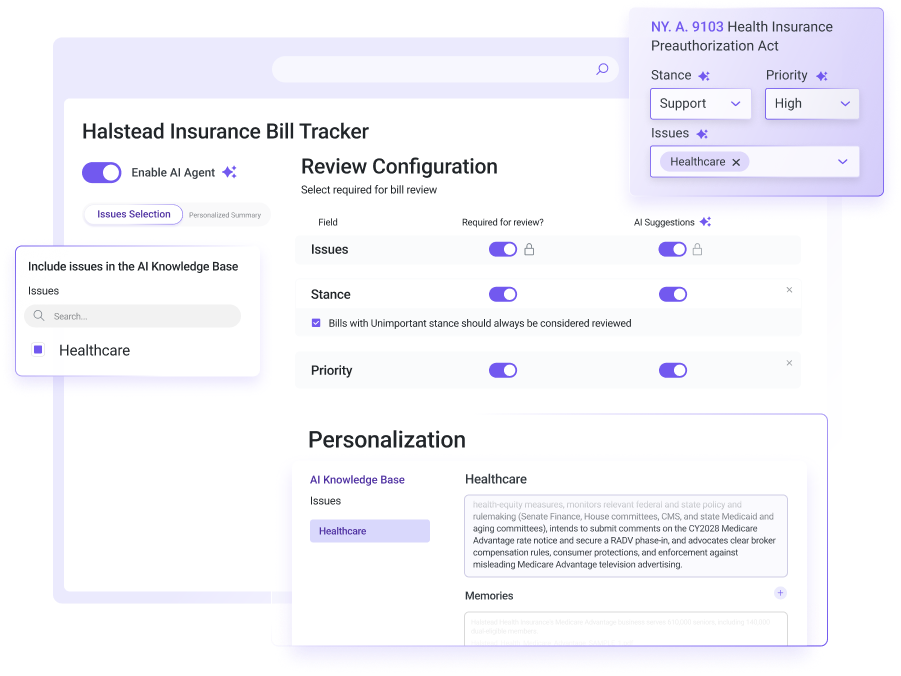
The Bill Tracker Agent reviews every bill for you and suggests a stance, a priority and an issue area. It also tells you whether a bill is worth watching. It lives inside AI Bill Tracking, so the suggestions are waiting when you open your tracker.
Ground Every Suggestion in Your Own Issues
Your issues are the playbook. Each issue your organization tracks in Quorum, whether healthcare, energy or tax, carries its own context: the URL, PDF and notes your team has added, plus what the Agent has learned from your team’s reviews.
When a bill arrives, the Agent first matches it to the issue it belongs to. Then it reasons from that issue’s context to suggest a stance and priority and write the summary. A reviewer in their first week works from the same playbook as your longest-tenured analyst. When someone leaves, the standard they built stays behind in the issue.
Set Up Context Once
The Agent reads from the issues you already manage, so there’s no second setup to build or keep current. Add a URL, a PDF and your own notes to an issue, and the Agent has what it needs. Nothing about it is a black box. Your team can see what the Agent has learned in each issue, correct it and choose which issues it uses.
Stay in Control of Every Position
Nothing is applied to a bill until your team confirms it. When a reviewer disagrees, they change the suggestion and move on. That correction becomes part of what the issue has learned, so the next similar bill reflects it. The more your team confirms and corrects, the better the Agent’s suggestions get.
4. Semantic Search Finds Bills Your Keywords Miss
Semantic search finds bills by what they mean, not just the words they use. It reads the whole bill and checks it against the concepts your organization cares about.
For 25 years, state bill tracking has run on keyword search. You pick a list of terms, and bills that use those terms show up. That works until a bill uses different language. A sponsor might name a concept something new, and a keyword list will never catch it.
For example, a bill might describe “third-party drug intermediaries” without ever using the term “PBM.” A keyword search for “PBM” would miss it. Semantic search reads for meaning, so it catches the bill.
That matters most when you cover many states at once, because every legislature drafts the same idea a little differently. Avoq uses AI Bill Tracking to power multi-state monitoring for its clients:
“AI Bill Tracking feeds into Avoq’s multi-state monitoring programs, giving our advocacy coalitions and clients with large operational footprints data-driven intelligence at scale. Efficiently identifying and analyzing related bills across state legislatures enhances our ability to advise on proactive public affairs and lobbying strategy.”
— Jonathan Scharff, Vice President of Insights, Avoq
Keep Keyword Search if You Want It
Keyword search still works in AI Bill Tracking. When you set up a tracker, choose keyword search or semantic search. Either way, the Bill Tracker Agent reviews every bill your search returns.
The two methods can return different bills. Set up one tracker of each on an issue you know well, and see which fits how your team works.
5. A New Alert System You Can Count On
AI Bill Tracking runs on a new alert system, so you hear about bill changes when they happen. State users told us some alerts and bill updates weren’t arriving the way they should. The new system fixes that.
That matters most in the weeks around a committee markup or a crossover deadline, when a bill can move twice in a day. To get the new alerts, track your bills in AI Bill Tracking.
What This Looks Like on Your Team
Picture a Tuesday in March, mid-session, with 60 new bills waiting across the states you cover.
Semantic search has already pulled in two bills your keyword list would have missed. Fifty-two of the 60 have a suggested stance, priority and personalized summary, each matched to the right issue with the reasoning attached. Bills that match your organization’s standard take seconds to confirm. That leaves the day for the bills that need a real debate.
When a reviewer disagrees, say the Agent tagged a bill “support” and your organization opposes it, they update the position and move on. The issue learns from it, and the next similar bill reflects the change no matter who reviews it. Your alerts keep everyone current as bills move.
Your Tracking Boards Have Already Moved
Quorum already upgraded every tracking board to AI Bill Tracking, so there’s nothing to migrate. Open your tracker and start reviewing. Tracking boards are still available for regulations, news and other lists. For bills, AI Bill Tracking is where you’ll get the new features.
Get Ready for 2027 Sessions Now
Pre-filing is already underway in many states, so now is the time to set up your issues and test semantic search. The work you put in before January shapes every suggestion the Agent makes once bills start moving.
Start with your top two or three issues. Add the context your team relies on, set up a tracker with each search method and confirm a few days of suggestions. By the first crossover deadline, your tracker will reflect your organization’s own standard.
The Bill Tracker Agent is included for Quorum State and Federal customers.
Request a Demo | Take a Product Tour
Frequently Asked Questions
What is AI Bill Tracking in Quorum?
AI Bill Tracking is Quorum’s enhanced bill tracking experience. It includes a new interface, personalized bill summaries, the Bill Tracker Agent, semantic search and a new alert system. Quorum State and Federal customers use it to find, review and act on legislation.
Do I need to move my tracking boards to AI Bill Tracking?
No. Quorum already upgraded every tracking board to AI Bill Tracking. Tracking boards are still available for regulations, news and other lists.
What is the difference between semantic search and keyword search?
Keyword search finds bills that use the exact terms you choose. Semantic search reads the whole bill and finds ones that match your concepts, even when the wording is different. Each tracker uses one method, so you can set up a tracker of each to compare results.
What does the Bill Tracker Agent do?
The Bill Tracker Agent reviews every bill in your tracker and matches it to the issue it belongs to. Then it suggests a stance, a priority and whether to watch the bill, and writes a summary from that issue’s context. Every suggestion comes with a plain-language reason.
How does the Bill Tracker Agent gather its data?
The Agent works from your organization’s issues in Quorum. Each issue holds the context your team added, such as a URL, a PDF and notes, plus what the Agent has learned from your reviews. It uses that issue context and the bill text to suggest a position. You choose which issues it can use.
Does the Agent apply stances on its own?
No. The Agent suggests a position, and your team confirms it before anything saves to the record. If you disagree, change it. The Agent learns from that correction for future bills on the same issue.